Spec-Driven Development with Spec Kit
In this post we are going to see what Spec-Driven development is and how GitHub’s Spec Kit makes it easy to get started.
What is Spec-Driven Development (SDD)
- Executable Specifications: Reverses the traditional “code is king” model by treating natural language specifications as the primary source of truth that directly generates implementation, rather than just serving as passive documentation.
- Constitutional Governance: Enforces immutable project principles through a “Constitution” that establishes non-negotiable rules before any coding begins.
- Structured AI Workflow: Replaces unstructured “vibe coding” with a disciplined, multi-stage pipeline:
- Specify & Plan: Decouples the “what” (requirements) from the “how” (tech stack), converting vague ideas into structured Product Requirement Documents (PRDs).
- Tasks & Implement: Breaks plans into parallelizable units of work and executes them in a strict Red-Green-Refactor loop where tests are written and verified before implementation code.
- Iterative & Agnostic: Uses AI agents to progressively refine intent into concrete artifacts, creating technology-independent specs that can generate multiple distinct implementations.
- For example: Moving from React to Vue, from Go to Python, etc. by using the same core requirements.
SDD vs “Vibe Coding”
- Limitations of “Vibe Coding”: Current AI coding often relies on “one-shot” prompting or unstructured chat loops, this degrades as complexity grows (lacking context, hard to maintain, loss of context, etc.).
- Structured Context Management: SDD replaces ephemeral chat history with persistent artifacts (spec files, plans, checklists), ensuring the AI agent retains full context of the project scope and constraints.
- From Generation to Engineering: Moves the focus from simply generating lines of code to engineering a system, requiring the AI to validate its own work against a pre-approved plan before execution.
- Reduction of Technical Debt: By enforcing planning and architectural review before code generation, SDD aims to prevent the “spaghetti code” often produced by unguided AI assistants.
SDD Phases
- Constitution & Specification (Phase 1): The developer establishes the “rules of the road” (coding standards) and the “destination” (functional requirements) without defining the specific technology stack yet.
- Technical Planning (Phase 2): The AI agent analyzes the spec to generate a detailed implementation plan, selecting libraries and architecture that adhere to the project’s Constitution.
- Atomic Task Breakdown (Phase 3): The plan is converted into a list of discrete, manageable tasks (e.g: Create database schema, build API endpoint, etc.) that can be tracked or executed in parallel.
- Verified Implementation (Phase 4): The agent executes tasks individually, typically requiring a passing test or validation step for one task before proceeding to the next to ensure structural integrity.
The “Constitution” concept
- Governance as Code: A foundational document (markdown file) that serves as the immutable “system prompt” for the project, dictating behavioral and technical boundaries for the AI agent.
- Non-Negotiable Constraints: Can enforce specific rules such as Always use Python, No external 3rd party libraries, or 100% test coverage required. Coding agent must adhere to this.
- Consistency Across Agents: Ensures that different AI models produce code that feels uniform and adheres to the same standards.
- Living Documentation: Unlike traditional wikis that often go ignored, the Constitution is actively read by the coding agent before every task, actively preventing architectural drift.
Getting started
Initialize repo once installed (installation instructions).
a) Greenfield:
specify init <PROJECT_NAME>b) Brownfield:
cd <existing_project_folder> && specify init --hereEstablish constitution:
/speckit.constitutionAction: Creates the
.specify/memory/constitution.mdfile.Goal: Define non-negotiable rules that the agent must follow. E.g: Always use Python.
Define intent (the spec):
/speckit.specifyAction: Generates a detailed requirement document (PRD) in
specs/.Goal: Describe what you want to build and why. Focus on user stories, goals, and success metrics. Do not talk about tech stack here.
Refine (optional but recommended):
/speckit.clarifyAction: The AI interviews you about gaps in your spec.
Goal: Fix underspecified areas. E.g: How should errors be handled?
Architectural Plan:
/speckit.planAction: Generates
plan.mdanddata-model.md.Goal: Define how to build it. This is where you specify the tech stack (Python, Postgres), libraries, and file structure.
Break Down Work:
/speckit.tasksAction: Creates
tasks.md.Goal: Converts the plan into a checklist of small, atomic, parallelizable coding tasks. E.g: Create API endpoint X, create database schema, etc.
Execute:
/speckit.implementAction: Writes the actual code.
Goal: The agent iterates through the task list one by one. In strict mode, it will write a test, verify it fails (Red), write the code, and verify it passes (Green) before moving to the next task.
Example run
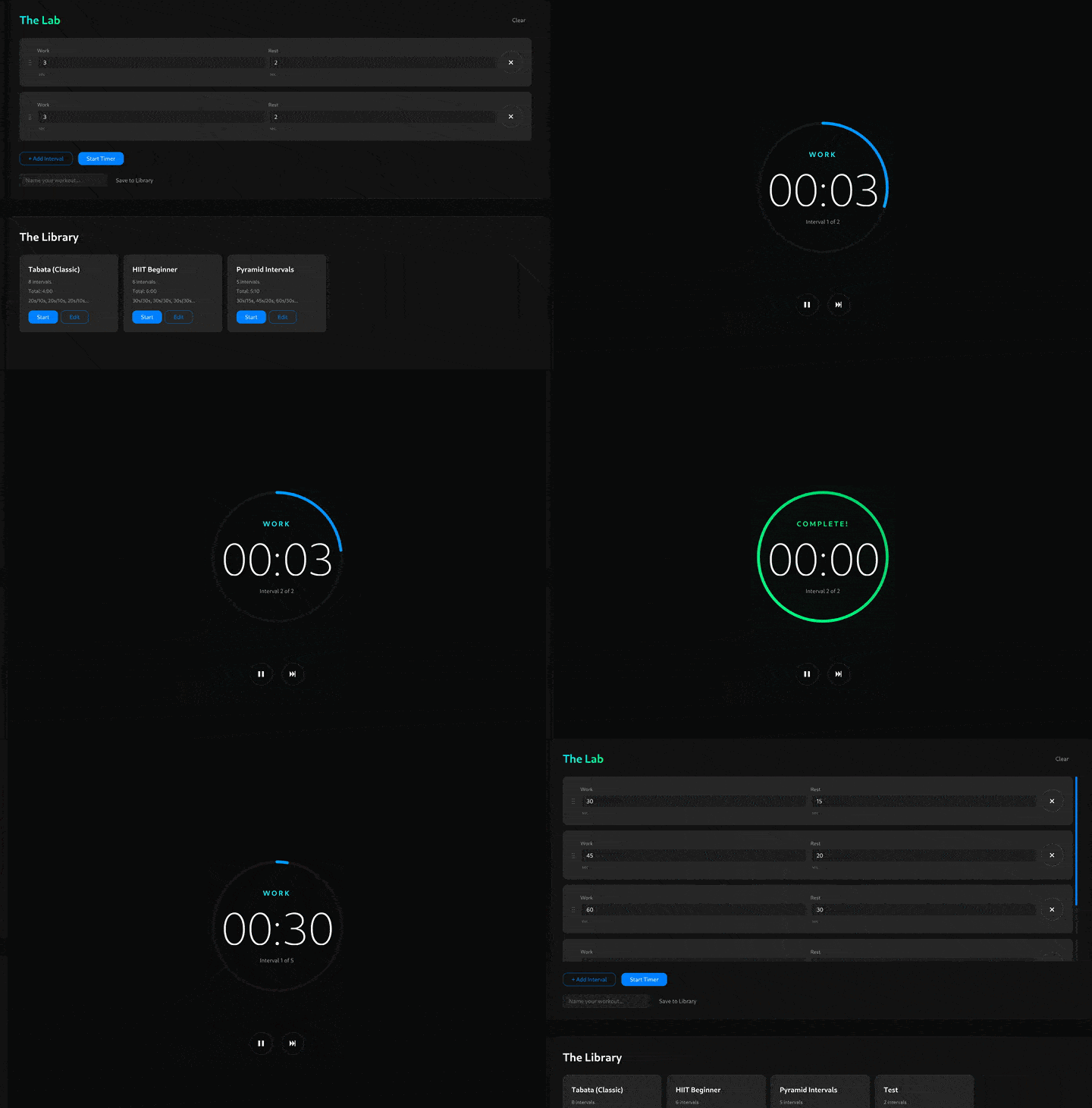
In this example we are going to build an intervals-workout timer web app.
Attention
This is just an example, I haven’t spent much time reviewing the prompts or outputs, this should be used to understand the process of working with Spec Kit, nothing else.
Initialize the project from the terminal and open it in your coding agent:
specify init interval-timer/
cd intervals-timer
/path/to/coding-agent-binary
In your coding agent, create the consitution file:
/speckit.constitution Fill the constitution with the bare minimum requirements for an intervals-timer web application. Some unbreakable rules:

- Don't use third party libraries
- Use standard CSS, HTML5 and JavaScript
- Use reactive web design
Now, define the specification for this app:
/speckit.specify I want to build a high-fidelity, aesthetically distinct web-based Interval Timer application. The goal is to move away from utilitarian, boring timers and create a "sleek", modern, and immersive experience.

1. Core User Flow & Layout
- Landing State: Upon opening the application, the view should be split vertically:
    - Top Section (The Lab): A dynamic Interval Configurator.
    - Bottom Section (The Library): A list containing both pre-defined presets (e.g., Tabata) and user-saved configurations.
- Active State: Once a timer is started (either by finishing a configuration or selecting a preset), the UI must transition smoothly into an "Active View," removing the clutter and focusing entirely on the ticking timer.

2. The Configurator (Functional Requirements)
- The system must support building a workout "chain" of intervals.
- Parameters per interval: Work Duration, Recovery/Rest Duration.
- Quick-Add Workflow: Users should be able to quickly add a new interval. By default, adding a new interval should duplicate the parameters of the previous one (to speed up standard HIIT setups).
- Irregular Support: Despite the quick-add feature, the user must have full control to edit specific intervals individually to create irregular patterns (e.g., Pyramid training: 30s work, 45s work, 60s work)

3. The Active Timer (Visuals & Behavior)
- Representation: The timer must be visualized as a circular, fluid interface.
- Behavior: The circle acts as a progress indicator that adapts and shrinks/fills based on the remaining time of the current interval.
- Animations: Transitions between "Work" and "Rest" states should be visually distinct (e.g., color shifts, pulse effects) but seamless.

4. Data Persistence
- Users must be able to save their custom configurations to the "Library" section for future use.

5. Design Philosophy
- Vibe: Sleek, modern, minimalist but not empty. It should feel like a premium tool.
- Responsiveness: Must look excellent on both desktop and mobile web.
Build the plan:
/speckit.plan Generate a technical implementation plan that utilizes modern browser standards without any build steps or external dependencies.

1. Technology Stack
- Core: Native HTML5, CSS3, and Modern JavaScript (ES6+ Modules).
- State Management: Use a lightweight, custom "Pub/Sub" or "Observer" pattern in a Store.js file to handle application state (current interval, time remaining, active/editing mode).
- Storage: localStorage for persisting user-saved timer configurations.
- Audio: Native HTML5 Audio API for interval beeps.

2. Architecture & File Structure
- Organize code using ES Modules (<script type="module">).
- Separate concerns into:
  - /js/core: Timer logic (high precision, accounting for drift) and State management.
  - /js/ui: DOM manipulation and rendering logic.
  - /css: Use CSS Variables (:root) for the theming and "sleek" styling to ensure easy updates.

3. Implementation Strategies
- The Circular Timer: Implement this using an SVG with stroke-dasharray and stroke-dashoffset. Manipulate the offset via JavaScript in a requestAnimationFrame loop to ensure the animation is buttery smooth and high-performance. Do NOT use Canvas unless strictly necessary for performance.
- Responsiveness: Use CSS Grid and Flexbox. The "Configurator" (Top) and "Library" (Bottom) should stack vertically on mobile but potentially align side-by-side on wide desktop screens if space permits.
- Reactive Design: Since we have no framework, ensure that a change in the Store triggers a re-render of only the necessary DOM elements to maintain performance.

4. Data Model
- Define a JSON structure for a "Workout" that supports the irregular intervals requirement (e.g., an array of objects where each object has duration, type (work/rest), and label).
Create tasks:
/speckit.tasks break this down into tasksImplement the app:
/speckit.implement Implement the tasks for this project, and update the task list as you go.
This is the resulting app: